iOS-style Replacement Dialer with Visual Themes and Call Tools
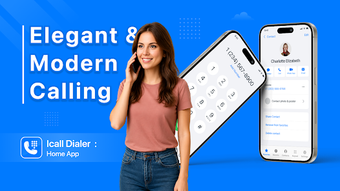
Experience a cleaner calling screen on Android with ICall Dialer : Home App from Anthem Apps Lab, a dialer replacement designed to bring an iOS-inspired look to the phone experience. The app focuses on call handling and personalization while consolidating caller presentation, audible alerts, and customization controls into a single interface. It targets Android users who want a modern calling UI and practical call-management options for everyday use.
Replaces the native dialer and consolidates contacts into one workflow
The app substitutes the stock phone interface with a responsive smart dialer that syncs with existing contacts and lets users assemble a Favorites list. Smart search and speed-dial access are built into the main screen, so commonly used numbers are reachable with fewer taps. This consolidation makes the tool useful for people who handle many daily calls and want a single entry point for contact access.
Manages unwanted calls while operating under Android telephony permissions
The tool includes a call blocker that maintains blacklists and filters spam or telemarketing numbers, operating inside Android's telephony framework. It requires standard telephony and contact permissions to function as a replacement dialer, which allows it to intercept and manage incoming calls directly rather than relying on separate utilities. These permission requirements are necessary for the app to enforce blocklists and send automatic replies.
Provides situational utilities for hands-free and social convenience
The app offers utilities targeted at specific needs: a fake call trigger that can be scheduled or started manually, audible call announcements for hands-free identification, and LED flash notifications for visual alerts. Quick response SMS templates let users send automated replies when a call cannot be answered. These features are grouped under the calling interface so users can access them without switching apps.
Depth of customization favors enthusiasts but has a short setup curve
The app exposes iOS-style incoming screens, high-definition backgrounds, and multiple answer/decline button layouts for visual tuning. Theme selection and layout choices give granular control over the incoming call presentation, and the smooth interface noted by users helps navigation. Nevertheless, the breadth of visual options may require time to configure for people who prefer a minimal, out-of-the-box dialer experience.
Best suited to appearance-minded Android users; expect ongoing development
The app is a practical choice for Android users who prioritize a themed calling interface and consolidated call controls. One caveat is that it is a newer entry in the category, so features and behavior may change as the developer refines the experience. For users willing to accept active development in exchange for a modern calling UI, the app is a usable solution.